

 CBLUE Chart — Healthcare
Structured
Documentation
For Clinical Practice
Deterministic documentation built for therapists, counselors, and private practice clinicians. Create consistent, defensible session notes without auto-writing or invented text.
Clinical Workflow
From Session to Structured Clinical Note
CBLUE Chart helps clinicians move from session details to structured, defensible documentation through a guided workflow built for real clinical practice.
Structured Clinical Workflow
Move through documentation in an organized session-based sequence instead of starting from a blank note after every visit.
Controlled Drafting
Notes are generated directly from the information you enter, helping preserve clinician control over documentation content.
Consistent, Defensible Output
Generate notes with clear structure that support documentation consistency, review, and clinical recordkeeping.
Built For Clinical Practice
Designed for the way clinicians actually document.
CBLUE Chart supports structured documentation across private practice, supervision, and behavioral health training environments.
Therapists & Counselors
Built for individual, couples, and family sessions with structured notes that reflect clinical reasoning without free-text chaos.
Private Practice Clinicians
Designed for independent providers who need consistent, defensible documentation without complex EHR systems.
Supervisors & Clinical Directors
Supports clearer review, oversight, and documentation consistency across clinicians and care environments.
Behavioral Health Students & Interns
Reinforces structured note sequencing, documentation discipline, and treatment-planning habits during training.
Workflow Structure
Structured from Session to Completed Note
CBLUE Chart guides clinical documentation through a clear, session-based sequence so providers can move from session details to completed documentation with more consistency and control.
Client Context
Start with session type, setting, participants, and visit details to establish the structure of the note.
Presenting Concern
Document the topics, concerns, and focus areas discussed during the session in a guided workflow.
Assessment
Capture clinical observations, presentation details, and assessment information using structured inputs.
Plan & Follow-Up
Record interventions, next steps, referrals, homework, and follow-up planning in one organized section.
Generated Session Note
Create a structured clinical note that can be reviewed, refined, and moved into the clinician’s charting system.
Product Walkthrough
See CBLUE Chart in Clinical Practice
A guided look at the clinical workflow, from secure access to final session note generation.
01 / 11
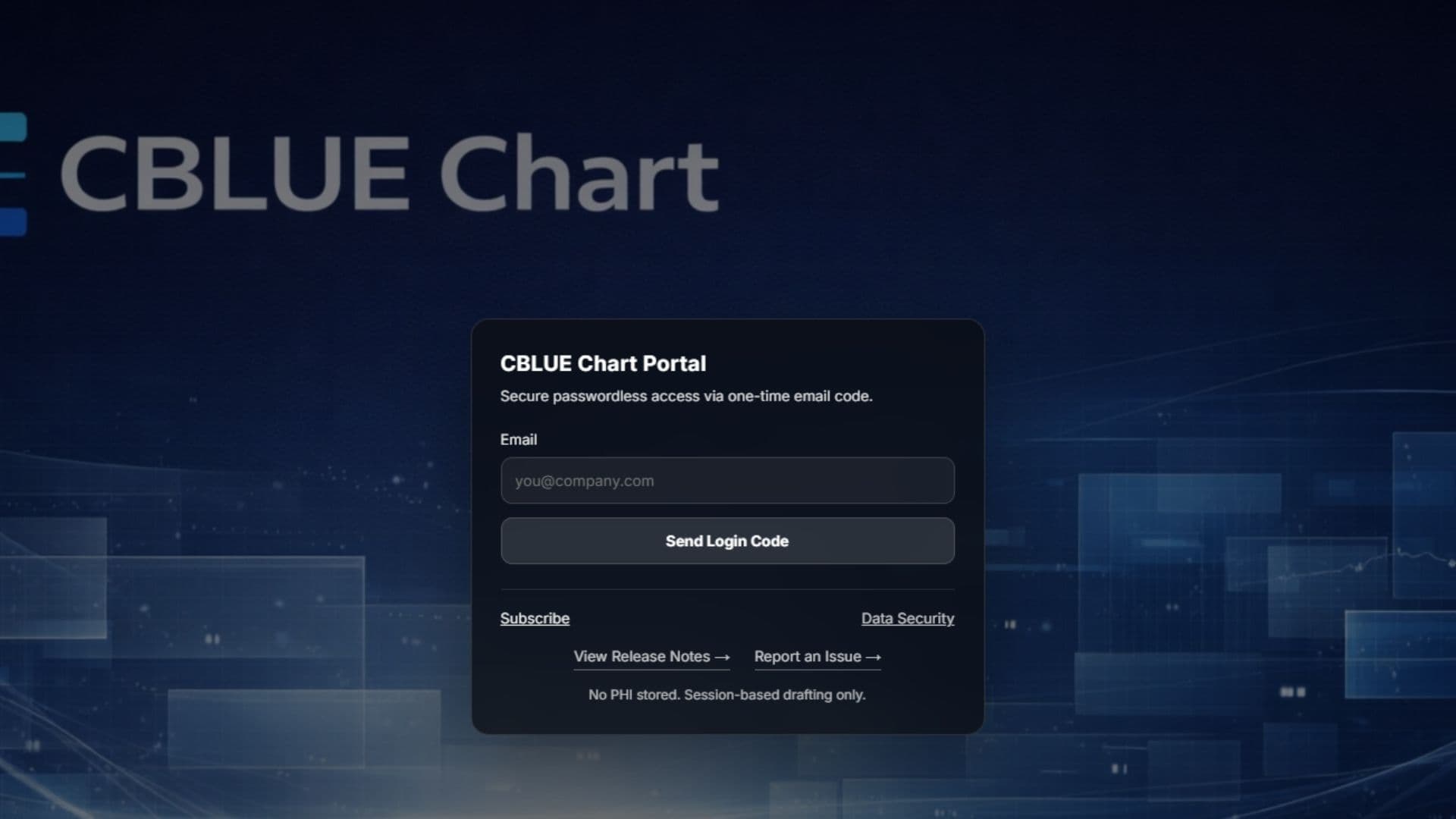
Portal Access
Secure access to the CBLUE Chart portal using passwordless login. Clinicians receive a one-time code via email for quick, secure entry into the system.
Beyond The Session Builder
More than just a session note workflow.
CBLUE Chart supports clinical documentation beyond a single session builder. Templates, tools, and library features help clinicians stay organized and consistent over time.
Client Tools
Coming SoonCreate structured tools for clients such as behavior charts, progress trackers, and goal sheets. Clinicians will be able to generate and share these tools directly with clients to support treatment between sessions.
Custom Template Builder
Build and manage note templates that match practice preferences, supervisory structure, or specialized clinical workflows.
Personal Library
Keep templates, references, and session resources in one place for easier reuse across future documentation sessions.
Data & Security
Built with privacy and clinician control in mind.
CBLUE Chart is designed to help clinicians structure documentation without storing patient records or generating uncontrolled text.
No Patient Data Storage
Session details entered into the builder remain within the active workflow and are not stored as permanent clinical records.
Deterministic Documentation
The generated note reflects only the information the clinician enters. CBLUE Chart does not invent clinical content or generate uncontrolled narrative text.
Clinician Controlled Output
Final documentation remains fully reviewable and editable before being transferred into the clinician’s primary charting system.
Get Started
Ready to streamline your clinical documentation?
Log in to the portal or begin your 14-day free trial. CBLUE Chart helps clinicians produce structured session notes without complicated EHR systems or uncontrolled documentation tools.
FAQ
Common Clinical Questions
Clear answers for clinicians evaluating whether CBLUE Chart fits their documentation workflow.
Is CBLUE Chart an EHR or medical record system?
No. CBLUE Chart is a structured documentation drafting platform. It helps clinicians build organized session notes, but it does not function as an EHR or long-term medical record storage system.
Does CBLUE Chart store patient data or PHI?
CBLUE Chart is designed to avoid storing patient records as permanent clinical data. The platform supports structured drafting workflows without functioning as a patient record archive.
Can I transfer the final note into my existing charting system?
Yes. CBLUE Chart is built to help clinicians generate a structured note that can then be reviewed and transferred into their primary documentation or charting system.
Is the documentation AI-written?
No. CBLUE Chart uses deterministic documentation logic. The output is based on the clinician’s structured inputs rather than uncontrolled AI-generated narrative text.
Who is this designed for?
CBLUE Chart is designed for therapists, counselors, private practice clinicians, supervisors, and behavioral health trainees who want more consistent documentation workflows.
How does the 14-day free trial work?
You create a CBLUE account, enter billing information, and begin a 14-day trial. If you cancel before the trial ends, you will not continue into the paid subscription period.
What devices can I use CBLUE Chart on?
CBLUE Chart is designed for phone, tablet, and desktop access so clinicians can work from the environment that fits their workflow best.